

Showing posts with label parent communication. Show all posts
Showing posts with label parent communication. Show all posts
Wednesday, November 9, 2016
Class Dojo Cards
I love this fun feature on Class Dojo! You can easily share cards with parents using Class Story. Lots of different holidays and reminders available. Check them out by clicking the image below.
And if you aren't using Class Dojo, check out this awesome, FREE tool at classdojo.com. Great for class management and communication. Plus they have an awesome growth mindset video series that you can access for free, even if you aren't using Class Dojo.

Wednesday, October 12, 2016
Seesaw at Parent-Teacher Conferences
Parent-teacher conferences are a fantastic time to show your parents some work samples that have been posted into Seesaw by your students. Even if you have already invited parents to view their kiddos' work in Seesaw, showcasing this tool at conferences can be an awesome reminder about what they'll be able to discover by checking out their son or daughter's learning journal on a regular basis.


Wednesday, May 18, 2016
Sharing End of the Year Photos with Parents
As the year comes to a close, many of you have memory-making trips and events planned, like field trips and plays, and you may want to easily share photos of these events with parents. In my classroom, I loved making photos into simple slideshows to share via email or on my blog, rather than sharing several individual pictures. Here are a few of my favorite tools to use to share these photos:


Friday, May 13, 2016
Parents Can Bulk Download Their Kids' Journals on Seesaw!

THIS IS AWESOME! As the year is coming to a close, let parents know that they can bulk download their child's Seesaw learning journal, to keep FOREVER AND EVER! There are some step by step instructions on the Seesaw Help Center. This is a really cool option for parents, as you get ready to archive this year's class and make room for next year's students.
Thursday, March 31, 2016

Thursday, March 10, 2016
Seesaw Print Feature
Seesaw has a cool new print feature that allows you to print students' posts, which converts them into a PDF with attached QR code. This would make a cool interactive bulletin board display - especially if you are doing spring conferences! The QR code needs to be scanned with either the Seesaw classroom or Seesaw parent app, so what a great way to encourage parents to get the app, if they haven't already!
To use the feature, click the three little dots underneath a post and select "print". That easy! Seesaw also created this great info poster to show students and parents how to scan the posts. Click the image to download and print a copy of the poster.
 Happy Seesaw-ing!
To use the feature, click the three little dots underneath a post and select "print". That easy! Seesaw also created this great info poster to show students and parents how to scan the posts. Click the image to download and print a copy of the poster.
Wednesday, November 4, 2015
Student Self-Reflection Videos with Seesaw
This is an awesome idea that we tried in some first grade classrooms this morning, and they turned out great! Many teachers have their students work on a self-reflection or report card to share students' perspectives with parents during conference time. Mr. Anderson had the idea to turn these into videos that he can show parents during conferences (or they can watch at home, if they have access to Seesaw.)

Students brainstormed answers to three questions:
1) What do you do really well in first grade?
2) What do you need to work on in first grade?
3) What is your favorite thing about first grade?
The students then worked with a partner and used the video tool of the Seesaw app (when using Seesaw on the computer you can't record video, but you could use a photo and record audio using your computer's microphone) to record their answers. One student "interviewed" the other, using the questions above. They posted that video to the student's Seesaw journal, then switched jobs. These videos are now available for the teacher to view and share with parents at conferences.
If it's too late to do this before your parent-teacher conferences, consider doing a post-conference self-reflection. These can easily be shared with parents by enabling parents to view student work on Seesaw.
I made a task card that you could use with this activity, and have students brainstorm their ideas ahead of time. They could even have a little "script" for their video. If you'd like a copy of the task card, click the image below.

Have Questions? Need help? You know where to find me! tracipiltz.youcanbook.me
Students brainstormed answers to three questions:
1) What do you do really well in first grade?
2) What do you need to work on in first grade?
3) What is your favorite thing about first grade?
The students then worked with a partner and used the video tool of the Seesaw app (when using Seesaw on the computer you can't record video, but you could use a photo and record audio using your computer's microphone) to record their answers. One student "interviewed" the other, using the questions above. They posted that video to the student's Seesaw journal, then switched jobs. These videos are now available for the teacher to view and share with parents at conferences.
If it's too late to do this before your parent-teacher conferences, consider doing a post-conference self-reflection. These can easily be shared with parents by enabling parents to view student work on Seesaw.
I made a task card that you could use with this activity, and have students brainstorm their ideas ahead of time. They could even have a little "script" for their video. If you'd like a copy of the task card, click the image below.
Have Questions? Need help? You know where to find me! tracipiltz.youcanbook.me
Wednesday, September 9, 2015
ClassDojo!
If you’ve never heard of ClassDojo … then you are in for a treat! ClassDojo is an awesome classroom management/communication tool and it’s FREE! ClassDojo allows you to easily engage students by providing immediate feedback and to keep parents in the loop. It is super fun and can be customized to meet your classroom’s needs.
To find out more about ClassDojo, click the image below to watch a short intro video. After watching the video, visit www.classdojo.com and you can quickly and easily set up your teacher account.

ClassDojo supports teachers by providing tools, tips and advice from other teachers on their blog. Check out their Teacher Resources page to download a teacher info sheet, or to read about ways other teachers are using ClassDojo in their classrooms.
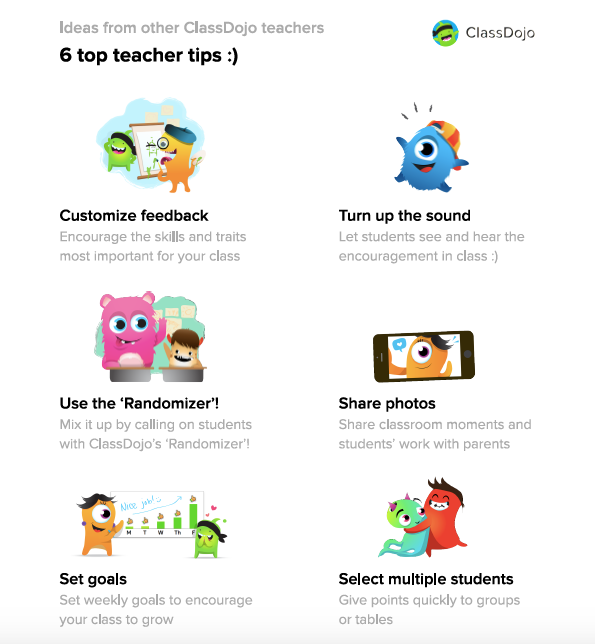
Here are teachers’ top tips for using ClassDojo: (click the image to download the document)
Sunday, August 30, 2015
Starting a New Year with Remind
If you used the awesome tool Remind in the past, and aren't sure how to start fresh for this school year, relax. It's so easy! Login to your existing account, and click "Add a new class." Creating a new class will generate a unique code to distribute to your new students' parents so they can subscribe to your updates.

If you haven't used Remind before, but are interested, visit the site www.remind.com for details on signing up for a FREE account. This is an awesome tool for safely and securely communicating with parents using text messaging. (They also just added a chat feature.) Using Remind allows you to quickly and conveniently communicate with parents and students using your smartphone without revealing your phone number or private information. Great tool!

If you haven't used Remind before, but are interested, visit the site www.remind.com for details on signing up for a FREE account. This is an awesome tool for safely and securely communicating with parents using text messaging. (They also just added a chat feature.) Using Remind allows you to quickly and conveniently communicate with parents and students using your smartphone without revealing your phone number or private information. Great tool!
Subscribe to:
Posts (Atom)