Click the image to view larger.
Showing posts with label christmas. Show all posts
Saturday, December 17, 2022
Sunday, December 11, 2022
Saturday, December 18, 2021
Saturday, December 4, 2021
Monday, November 22, 2021
Sunday, December 20, 2020
Saturday, December 12, 2020
Saturday, December 5, 2020
Saturday, December 14, 2019
Weekly Tech-y News December 16th-20th

Click the image above to view larger, and check out my Flipgrid for a tutorial on using the app DoInk Green Screen! Just a reminder that the Flipgrid topic has TONS of tech-y tutorials - one for each week of Tech-y News!
Friday, November 29, 2019
Sunday, December 9, 2018
Monday, November 26, 2018
Using Fill in the Blank on Classkick
Tuesday, December 19, 2017
Gingerbread Men in PicCollage Kids
This was such a fun, simple way to introduce students (and teachers!) to PicCollage Kids, and the concept of setting an image as a background and having students complete a project. You could either send students an image (via Seesaw or AirDrop), or let them use the web search tool in PicCollage to find a blank gingerbread man template.
I like the idea of using Seesaw Activities to distribute the image to students, plus give them directions. Teachers can give students audio AND visual directions on how to complete the task in PicCollage, then upload to Seesaw under Activities & it will be organized if you tag a skill or folder. I also like that when using Activities, I get the grid view where I can see which students have completed the task, and which I'm still waiting on.
Labels:
christmas,
gingerbread man,
ipads,
pic collage,
pic collage kids,
seesaw
Sunday, December 17, 2017
Tuesday, December 12, 2017
Christmas Books with Green Screen Awesomeness
This project was so much fun! Inspired by Brigitte Hollohan, we used the DoInk Green Screen app ($2.99) to take photos of each student in Mrs. Parisien's first grade in front of an image of Santa in the night sky. We used this image, but you could use any you like. It would be really fun to let students make their own using the Make a Scene: Christmas app ($2.99).
Once the pictures were taken, we could have done any number of things with them! Print them for cute Christmas cards or gifts, add to Seesaw and type or tell their story, create a collage in PicCollage Kids ... really the possibilities are endless! We decided to have each student write a Dear Santa letter using this cute FREE template, then load all the photos into Book Creator app, and have students read their "Dear Santa" letters onto each page. It easily shared to Seesaw, and turned out absolutely adorable!
Sunday, December 10, 2017
Thursday, December 7, 2017
Christmas Tree Apps
There are several fun, free Christmas tree apps for your iPad that allow students to be creative and decorate their own Christmas trees. Use these apps for math problems: Have them create arrays or simple equations on the trees using the ornaments, then put into Seesaw or another app to annotate, solve and explain their thinking. You could also have them create illustrations for stories and upload to apps such as Seesaw, Shadow Puppet Edu, or Book Creator, where they can add text and voice.
Monday, December 19, 2016
Google Santa Tracker
Awesome activities to get you through these last few days before winter break! Check it out at santatracker.google.com/village.html.
Sunday, December 18, 2016
Saturday, December 17, 2016
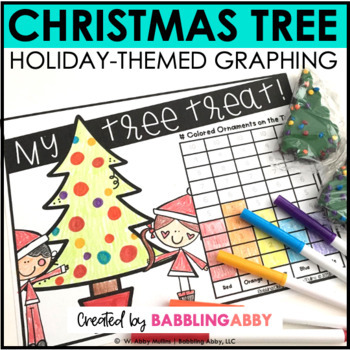
Christmas Tree Treat Freebie
This fun graphing activity from Babbling Abby would work well with the Seesaw text label or drawing tools. You'll need some Little Debbie Christmas Tree Brownies for this graph (I found some at Target). Upload a screenshot of the pages and have students use the drawing tool to color the tree, adding ornaments to match the candy ornaments on their brownie. They can then use the text label or drawing tool to complete the graph and answer the questions. Yummy learning ensues!
Labels:
christmas,
graphing,
math,
seesaw,
text labels
Subscribe to:
Posts (Atom)